Essential Education Icons for Modern Projects
Why Visual Consistency Matters in Learning Materials
In any educational setting, clarity is everything. Whether you're designing a classroom presentation, building a learning management system, or creating marketing materials for a school, the visual language you use plays a crucial role in how information is received. A cohesive set of icons does more than just decorate a page; it creates a silent guide that helps users navigate complex ideas quickly. This is where a dedicated bundle of education-themed graphics becomes an invaluable asset for creators, educators, and professionals alike.
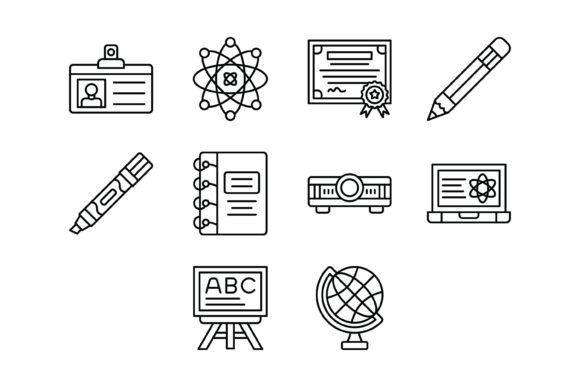
Exploring the 10 Education Outline Icons Bundle
This collection is a thoughtfully curated set of 10 distinct vector icons, each representing a core concept within the academic and learning world. The icons include a Student Card for representing enrollment or identity, a Science icon perfect for STEM-related content, and a Diploma symbolizing achievement and certification. You'll also find essential tools like the Pencil, Marker, and Notebook, which are fundamental to the act of learning and note-taking.
Beyond the traditional, the bundle acknowledges modern education with icons for a Projector and a Laptop, essential for digital classrooms and e-learning. The Blackboard icon pays homage to classic teaching methods, while the Globe represents global studies, geography, or international education programs. Each icon is crafted in a clean, outline style, ensuring they are versatile, unobtrusive, and easily integrated into a wide range of design aesthetics.
Practical Uses for Creators and Professionals
The true value of this icon set lies in its application. For a teacher or professor, these icons can transform a dense slide deck into an engaging visual story. Use the Laptop icon next to an assignment submission link or the Diploma icon to highlight a certification module. This simple addition helps students process information faster and reduces cognitive load.
For entrepreneurs and small business owners in the edtech space, consistent branding is key. Using the Science icon across your app's UI, website, and promotional graphics creates a recognizable visual identity. A freelance designer can save significant project time by having a ready-made, professional set of education icons on hand for client work, from designing school websites to creating printable worksheets and educational games.
Technical Flexibility for Any Platform
A major consideration when choosing design assets is compatibility. This bundle is delivered in five industry-standard formats: AI (Adobe Illustrator), EPS, JPG, PNG (with transparent background), and SVG. This range ensures the icons are ready for virtually any project.
- AI & EPS: Perfect for professional designers who need full vector editing capabilities in software like Illustrator or Affinity Designer.
- SVG: Ideal for web developers and app creators. SVGs scale perfectly to any size without losing quality and are easily styled with CSS.
- PNG (Transparent): The go-to for quick use in presentations, documents, and social media graphics where you need to place the icon over a colored background.
- JPG: Useful for situations where a transparent background isn't needed, such as in simple web layouts or printed handouts.
Each icon is a vector, meaning you can scale it from the size of a favicon to a billboard without any pixelation. This is a critical feature for maintaining quality across mobile apps, responsive websites, and high-resolution print materials.
Integrating Icons into Your Workflow
Getting started is straightforward. After downloading the zip file, you extract the icons and choose the format that best suits your current tool. For a blog post in WordPress, you might upload the PNG files directly into your media library. For a PowerPoint presentation, the PNGs work perfectly. If you're building a website with a tool like Figma or Sketch, importing the SVG files allows you to customize colors and strokes to match your site's palette.
The icons are designed for maximum usability, meaning they are clear at small sizes and have a consistent stroke weight and style. This uniformity is what separates a professional-looking project from an amateur one. You can use the Projector icon for an event about public speaking or the Notebook icon for a blog about study tips, creating instant visual context for your audience.
Choosing the Right Visual Assets
When selecting any design resource, it's wise to consider your long-term needs. This particular bundle offers a focused set of 10 icons, which is excellent for specific education-themed projects. However, if your work spans multiple industries, you might eventually seek out larger, more generalized icon libraries. For now, this collection provides a complete and coherent toolkit for education-focused work.
Always check the licensing to ensure it fits your intended use, whether for personal, commercial, or client projects. The ability to edit and scale these vectors gives you tremendous creative control, allowing you to adapt them to any brand guideline or design requirement. Ultimately, having a reliable set of education icons streamlines your design process, elevates your content, and communicates your message with professional polish. This bundle is a practical step toward achieving that visual coherence in all your educational materials.